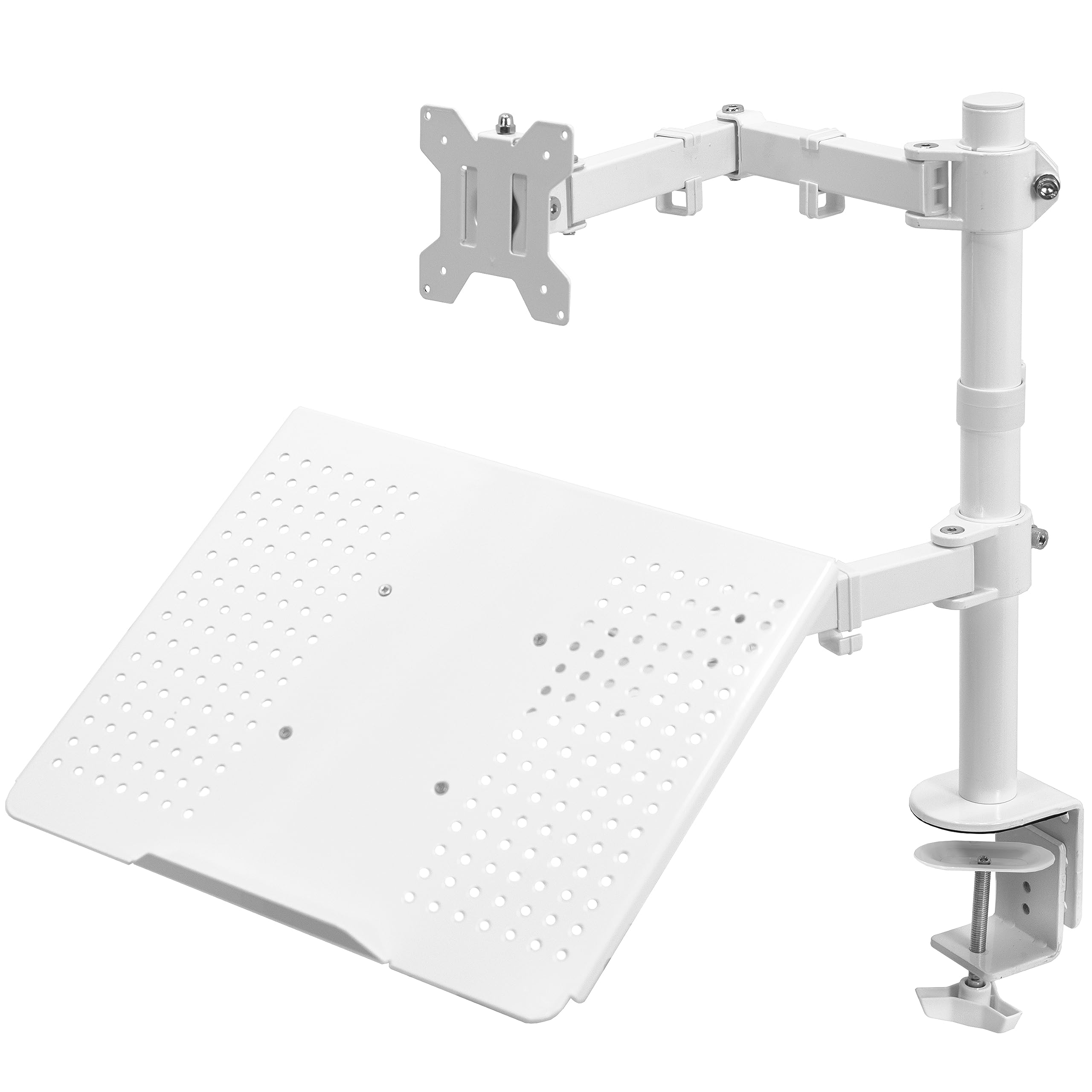
The VIVO Dual Screen Stand pairs an adjustable monitor arm with a vented laptop tray, giving a one-monitor workspace more flexible positioning and a clearer desk surface.
This VIVO Dual Screen Stand review looks at its fit, mounting options, and practical tradeoffs for mixed-screen setups.
VIVO Dual Stand Review Summary
The quick verdict
3,000+ ratings
Read Amazon ReviewsVIVO Dual Screen Stand
A desk mount for buyers who want to position one monitor and a laptop while reclaiming space beneath them.
- Monitor compatibility: screens from 13 to 32 inches, up to 22 pounds, with 75 × 75 mm or 100 × 100 mm VESA mounting holes.
- Laptop support: a vented tray accommodates laptops up to 17 inches.
- Monitor movement: +15° to -15° tilt, 180° swivel, 360° rotation, and height adjustment along the center pole.
- Screen orientation: the monitor can be positioned in portrait or landscape orientation.

Pros
- Combines a monitor arm and laptop tray in one desk-mounted setup.
- Supports portrait or landscape monitor orientation, with multiple adjustment options.
Consider before buying
- The monitor’s weight, screen size, and VESA pattern must all fit the stated compatibility limits.
- The laptop tray is sized for devices up to 17 inches, so buyers should check their laptop’s dimensions before ordering.
Read the full review summary
This stand is designed for a workstation built around one monitor and one laptop. The monitor mount accommodates screens from 13 to 32 inches and up to 22 pounds, while the tray supports laptops up to 17 inches.
That combination can suit office work, study, or other routines where a laptop and larger display share the desk.
Its articulating arm offers tilt, swivel, rotation, and height adjustment along the center pole, and the monitor can be set in portrait or landscape orientation.
A C-clamp or optional grommet mount secures the stand to a desk, while detachable cable clips help guide power and AV cables.
Before buying, check your monitor’s weight and VESA pattern, laptop dimensions, desk thickness, and the clearance needed for the clamp or grommet.
The buying factors
VIVO Dual Stand Scorecard
Editorial scores reflect listed features and buyer fit; they are not laboratory measurements or customer ratings.
Monitor compatibility
Supports a useful 13-to-32-inch range and up to 22 pounds, with common 75 × 75 mm or 100 × 100 mm VESA patterns.
Laptop and monitor pairing
The dedicated tray supports laptops up to 17 inches, making the stand useful for a mixed-screen desk.
Viewing adjustment
Tilt, 180-degree swivel, 360-degree rotation, and pole height adjustment give several ways to position the monitor.
Mounting flexibility
A C-clamp supports surfaces up to 3.4 inches thick, and an optional grommet mount supports surfaces up to 3 inches thick.
Cable organization
Detachable clips along the arms and center pole provide a straightforward way to route power and AV cables.
Setup convenience
Detachable VESA plates and included assembly hardware are intended to simplify mounting and installation.
Key Features and Specifications of VIVO Dual Stand
- Monitor compatibility: screens from 13 to 32 inches, up to 22 pounds, with 75 × 75 mm or 100 × 100 mm VESA mounting holes.
- Laptop support: a vented tray accommodates laptops up to 17 inches.
- Monitor movement: +15° to -15° tilt, 180° swivel, 360° rotation, and height adjustment along the center pole.
- Screen orientation: the monitor can be positioned in portrait or landscape orientation.
- Desk attachment: a heavy-duty C-clamp fits surfaces up to 3.4 inches thick; an optional grommet mount fits surfaces up to 3 inches thick.
- Cable routing: detachable clips on the arms and center pole help organize power and AV cables.
- Installation: detachable VESA plates and assembly hardware are included.
Pros and Cons of VIVO Dual Stand
Pros
- Combines a monitor arm and laptop tray in one desk-mounted setup.
- Supports portrait or landscape monitor orientation, with multiple adjustment options.
- Offers both clamp and optional grommet mounting methods.
- Cable clips and detachable VESA plates help keep setup and repositioning manageable.
Consider before buying
- The monitor’s weight, screen size, and VESA pattern must all fit the stated compatibility limits.
- The laptop tray is sized for devices up to 17 inches, so buyers should check their laptop’s dimensions before ordering.
- The clamp and optional grommet mounts have different desk thickness limits; the intended attachment point needs to accommodate one of them.
Who Should Buy VIVO Dual Stand?
Good fit
Consider the VIVO Dual Screen Stand if your desk setup uses one external monitor alongside a laptop and you want each positioned on a mount rather than left flat on the work surface.
The dedicated tray makes the arrangement especially relevant when the laptop remains part of your routine for work, study, or calls.
It is also a good fit if monitor orientation and placement vary by task.
The arm’s tilt, swivel, rotation, and height adjustment allow you to change the screen position, and the detachable clips can help route cables along the mount.
Before choosing it, measure the laptop and desk, confirm the monitor’s VESA pattern and weight, and decide whether the clamp or grommet approach fits your surface.
A few minutes of checking these details can prevent a mismatch with the stand’s limits.
Who should skip it
Skip this layout if you need to mount two external monitors: the described design pairs one monitor with one laptop tray.
Also look elsewhere if your monitor exceeds the size or weight limits, lacks a compatible VESA pattern, or your desk cannot accept either mounting method.
If you prefer a freestanding base that rests on the desk, this clamp-or-grommet attachment design may not suit your setup.
How the VIVO Dual Stand Fits a Mixed-Screen Desk
A monitor arm with a defined laptop role
The stand’s main distinction is its combination of one VESA monitor mount and a laptop tray.
That makes it a practical format for buyers who use a larger external display while keeping a laptop accessible, rather than a solution for a pair of external monitors.
The laptop size limit gives a clear starting point, but checking the device’s actual footprint is sensible before relying on the tray.
Adjustment for changing tasks
Tilt, swivel, rotation, and height adjustment along the center pole offer several ways to position the monitor. Portrait orientation may be useful for some reading or document workflows, while landscape remains a familiar general-purpose layout.
These adjustments help tailor the arrangement, though the available description does not specify arm reach or a numerical height range, so buyers who need a particular position should consider their desk geometry.
Desk fit and installation
The C-clamp accommodates surfaces up to 3.4 inches thick, while the optional grommet mount accommodates surfaces up to 3 inches thick. Those limits make desk thickness and the chosen attachment point central compatibility checks.
The detachable VESA plate and included assembly hardware are intended to make installation more manageable, but the workspace still needs room for the mount and its moving parts.
Cable routing and everyday tidiness
Detachable cable clips along the arms and pole give power and AV leads a route that follows the mount. This can make the monitor’s connections easier to organize as its position changes.
The clips support a cleaner arrangement, although cable length and connector placement will still influence how much slack is needed.
Alternatives to VIVO Dual Stand
One supplied alternative closely matches the desk-mount use case; the other options do not offer as useful a comparison for a monitor-and-laptop setup.
Computer Monitor Arms alternative
60,000+ ratings
Read Amazon ReviewsVIVO Dual Monitor Desk Mount STAND-V002
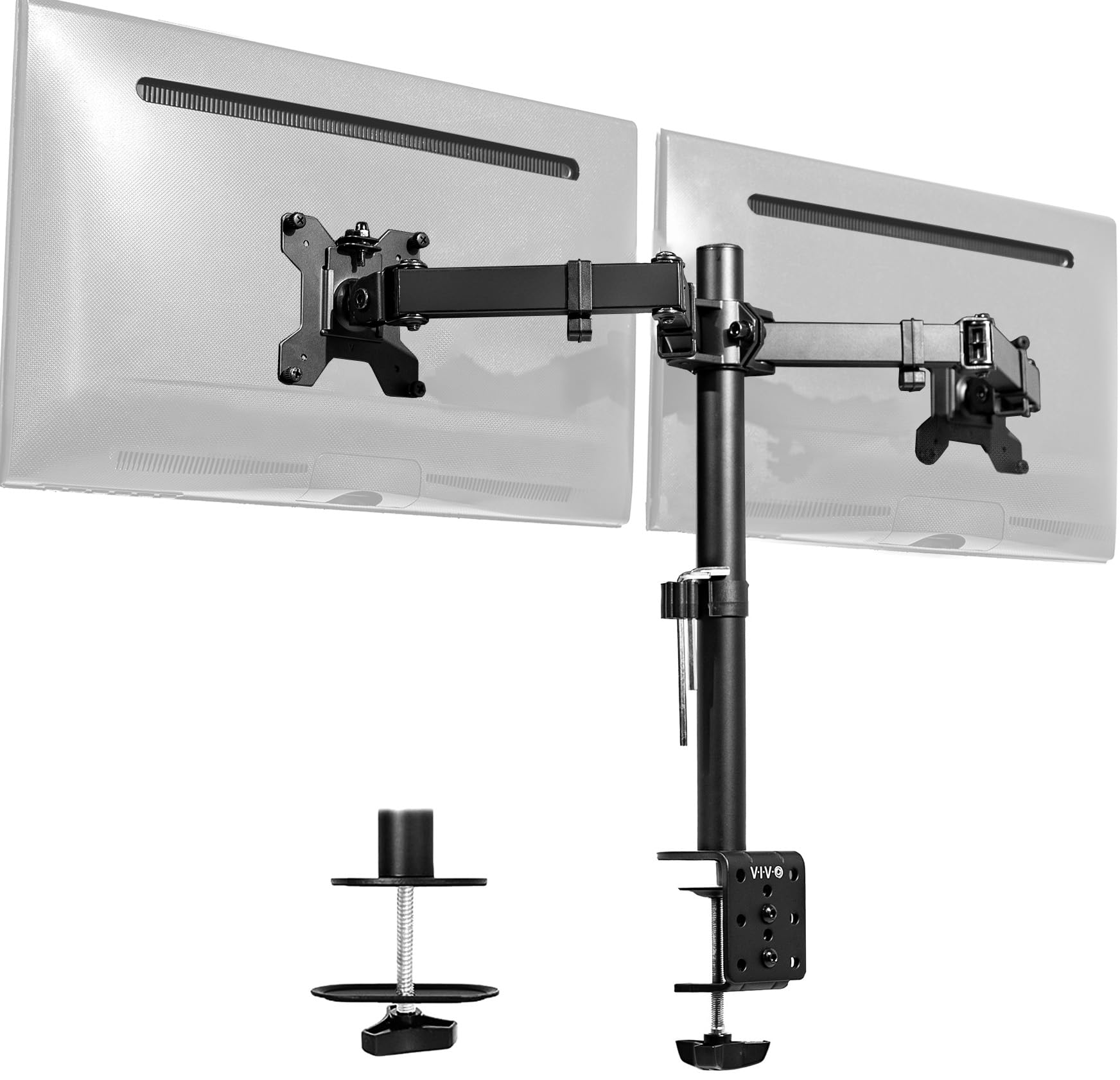
Choose the Dual Screen Stand when a laptop tray is central to your setup. The STAND-V002 is the closer fit if you need two externally mounted monitors and do not need the dedicated laptop tray.
- This VIVO mount holds two monitors, each from 13 to 30 inches and up to 22 pounds, with 75 × 75 mm or 100 × 100 mm VESA patterns.
- It provides tilt, swivel, rotation, and height adjustment, with a C-clamp or optional grommet mount.
- The VIVO Dual Screen Stand combines one monitor arm with a tray for a laptop up to 17 inches.
Is VIVO Dual Stand Worth It?
The VIVO Dual Screen Stand is worth considering for a desk built around one external monitor and a laptop.
Its combination of monitor articulation, a laptop tray, cable clips, and two attachment options covers the key needs of that arrangement.
Check monitor VESA compatibility and weight, laptop size, and desk thickness before buying.
If those details match and you want both devices positioned on a desk mount, this is a well-targeted option; if you need a second external monitor or a freestanding base, its layout is not the right match.
Your review at a glance
3,000+ ratings
Read Amazon ReviewsVIVO Dual Screen Stand
A desk mount for buyers who want to position one monitor and a laptop while reclaiming space beneath them.
- Monitor compatibility: screens from 13 to 32 inches, up to 22 pounds, with 75 × 75 mm or 100 × 100 mm VESA mounting holes.
- Laptop support: a vented tray accommodates laptops up to 17 inches.
- Monitor movement: +15° to -15° tilt, 180° swivel, 360° rotation, and height adjustment along the center pole.
- Screen orientation: the monitor can be positioned in portrait or landscape orientation.