The SABRENT DS-4SSD is a four-bay USB 3.0 dock for people who regularly connect or swap several 2.5-inch SATA SSDs and hard drives.
This sabrent hdd docking station review focuses on its capacity, tool-free access, cooling, and the limits buyers should weigh before choosing it.
SABRENT DS-4SSD Review Summary
The quick verdict
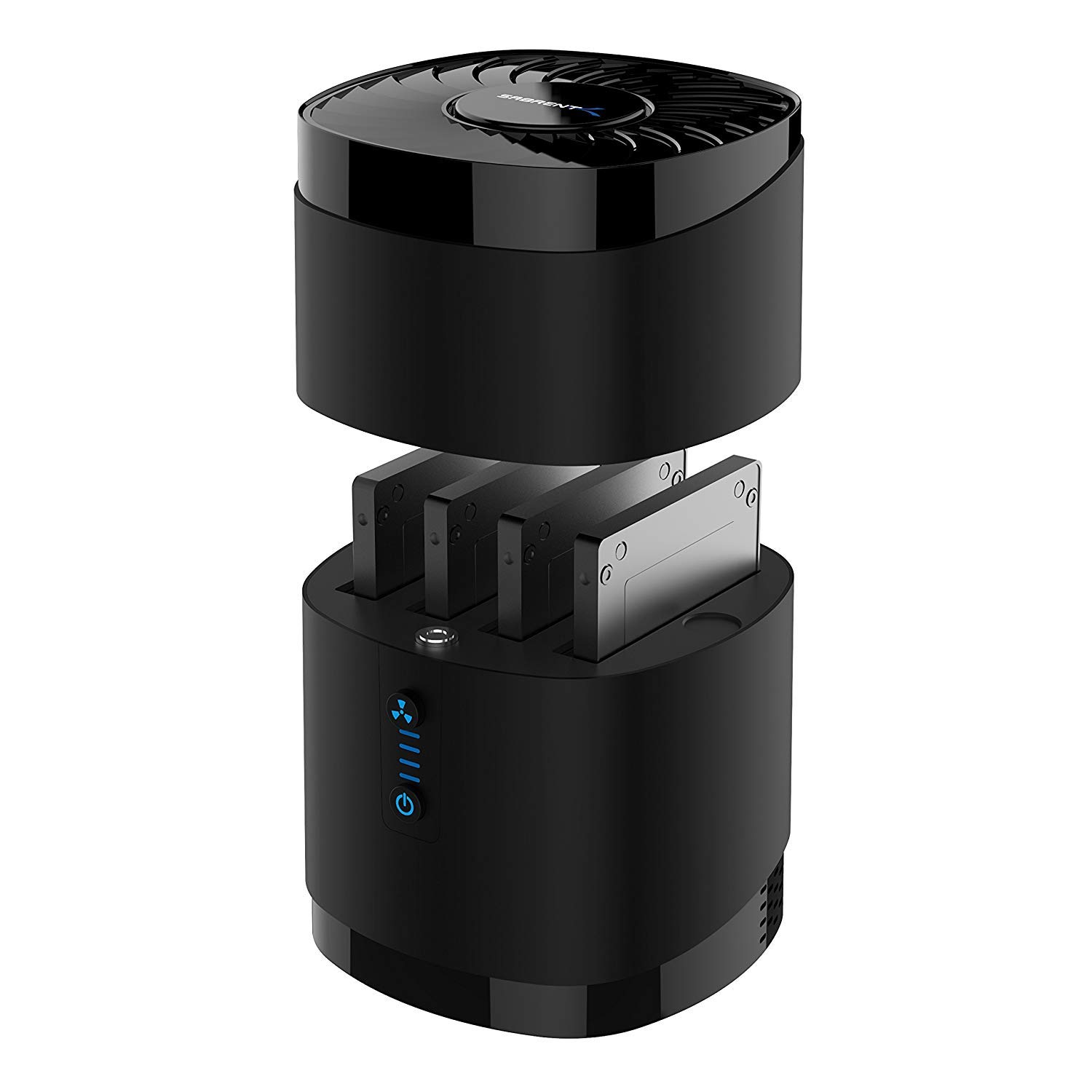
3,000+ ratings
Read Amazon ReviewsSABRENT DS-4SSD 4-Bay Docking Station
A practical fit for people who rotate several slim 2.5-inch SATA SSDs or hard drives and want tool-free access at one workstation.
- Four bays for 2.5-inch SATA SSDs or HDDs, supporting up to 16TB per drive and a maximum drive thickness of 12.5mm.
- USB 3.0 interface with a maximum stated transfer rate of 5Gbps; backward compatible with USB 2.0 and 1.1.
- Tool-free drive access and a magnetic cover designed to make swapping drives quick.
- Built-in cooling fan with an optional on/off switch for noise and power control.

Pros
- Four drive bays allow several compatible drives to share one workstation connection.
- Tool-free access and a magnetic cover are convenient for users who rotate drives regularly.
Consider before buying
- The 12.5mm thickness ceiling rules out 15mm drives, so check each drive’s dimensions before buying.
- The dock is not compatible with RAID; buyers needing an array should choose a different type of storage setup.
Read the full review summary
The DS-4SSD’s main appeal is consolidating up to four compatible drives in one desktop dock. It supports 2.5-inch SATA SSDs or HDDs up to 12.5mm thick, with a stated capacity of up to 16TB per bay.
A magnetic cover and tool-free drive access make frequent changes simpler than installing each drive in a separate enclosure.
Its design suits users managing multiple backup, archive, or project drives who value quick access and a fan-equipped dock. The fixed 2.5-inch SATA format is a firm boundary: it is not intended for 15mm drives or RAID use.
The USB 3.0 interface is rated for up to 5Gbps, but actual transfers also depend on the drives, host, and connection.
The buying factors
SABRENT DS-4SSD Scorecard
Editorial scores reflect listed features and buyer fit; they are not laboratory measurements or customer ratings.
Multi-drive capacity
Four bays and support for up to 16TB per compatible 2.5-inch drive make it useful for consolidating a sizable drive collection.
Drive access
Tool-free swapping and a magnetic cover favor quick changes without opening a screw-fastened enclosure.
Drive compatibility
It covers 2.5-inch SATA SSDs and HDDs up to 12.5mm, but the 15mm and RAID exclusions narrow its fit.
Connection flexibility
USB 3.0 offers up to 5Gbps, with backward compatibility for USB 2.0 and 1.1 devices.
Cooling provisions
A built-in fan and optional on/off switch give users a way to manage airflow and fan noise.
Setup simplicity
Plug-and-play operation with Windows, macOS, and Linux avoids driver setup for standard use.
Key Features and Specifications of SABRENT DS-4SSD
- Four bays for 2.5-inch SATA SSDs or HDDs, supporting up to 16TB per drive and a maximum drive thickness of 12.5mm.
- USB 3.0 interface with a maximum stated transfer rate of 5Gbps; backward compatible with USB 2.0 and 1.1.
- Tool-free drive access and a magnetic cover designed to make swapping drives quick.
- Built-in cooling fan with an optional on/off switch for noise and power control.
- Plug-and-play compatibility with Windows, macOS, and Linux for standard operation without driver installation.
- Not compatible with RAID or 15mm drives.
Pros and Cons of SABRENT DS-4SSD
Pros
- Four drive bays allow several compatible drives to share one workstation connection.
- Tool-free access and a magnetic cover are convenient for users who rotate drives regularly.
- The built-in fan and optional switch provide a cooling feature with some control over fan operation.
- Broad operating-system support and standard plug-and-play setup simplify routine use.
Consider before buying
- The 12.5mm thickness ceiling rules out 15mm drives, so check each drive’s dimensions before buying.
- The dock is not compatible with RAID; buyers needing an array should choose a different type of storage setup.
- USB 3.0’s 5Gbps figure is a maximum interface rate, not a guarantee of drive-to-computer transfer speed.
Who Should Buy SABRENT DS-4SSD?
Good fit
Consider the DS-4SSD if you routinely connect several 2.5-inch SATA drives and prefer a shared dock over separate enclosures.
Four bays can keep a collection of SSDs or HDDs accessible from one setup, while the tool-free design makes swapping drives more convenient for rotating archives or project storage.
The fan may be useful when multiple drives are operating in the dock, and its optional switch lets you manage fan operation.
Before choosing it, confirm that every drive is a SATA model no thicker than 12.5mm and that your workflow does not require RAID.
Also make sure your computer has a suitable USB connection for the speed you expect; the dock is backward compatible, but older USB standards have lower limits.
Who should skip it
Skip this model if your drives are 15mm thick, or if you need a RAID enclosure. The stated design is for compatible 2.5-inch SATA drives and does not support RAID.
It may be more dock than you need if you connect only one drive occasionally. In that case, compare simpler single-drive options against the value you place on having multiple bays and quick drive changes.
How the SABRENT DS-4SSD Fits a Multi-Drive Workflow
Four bays for rotating SATA drives
The four-bay layout is most useful when several 2.5-inch drives are part of the same routine. It gives users one place to access those drives without having to keep multiple small enclosures on the desk.
The stated maximum of up to 16TB per bay offers room for large drives, though each unit still needs to meet the 12.5mm thickness limit.
Tool-free swaps reduce setup friction
A magnetic cover and tool-free access suit workflows where drives are changed often, such as moving among archives or project disks.
This convenience depends on using compatible 2.5-inch SATA drives; buyers with a mixed collection should check each drive’s interface and height before relying on the dock as a shared station.
USB speed depends on the whole chain
The USB 3.0 connection is specified for up to 5Gbps and supports older USB standards. That gives it broad connection flexibility, while the practical transfer rate will also be influenced by the host port and the installed drive.
Buyers focused on high-speed work should confirm their computer’s available USB connection and consider the capabilities of the particular drives they plan to use.
Cooling and operating noise
A built-in fan is a useful design feature when several drives are in service, and the optional switch gives the user a way to control fan operation.
The product description characterizes the fan as whisper-quiet, but noise sensitivity is personal; anyone planning to keep the dock beside a quiet workspace may want to consider whether a fan-equipped design suits that environment.
Alternatives to SABRENT DS-4SSD
Hard Drive Docking Stations alternative
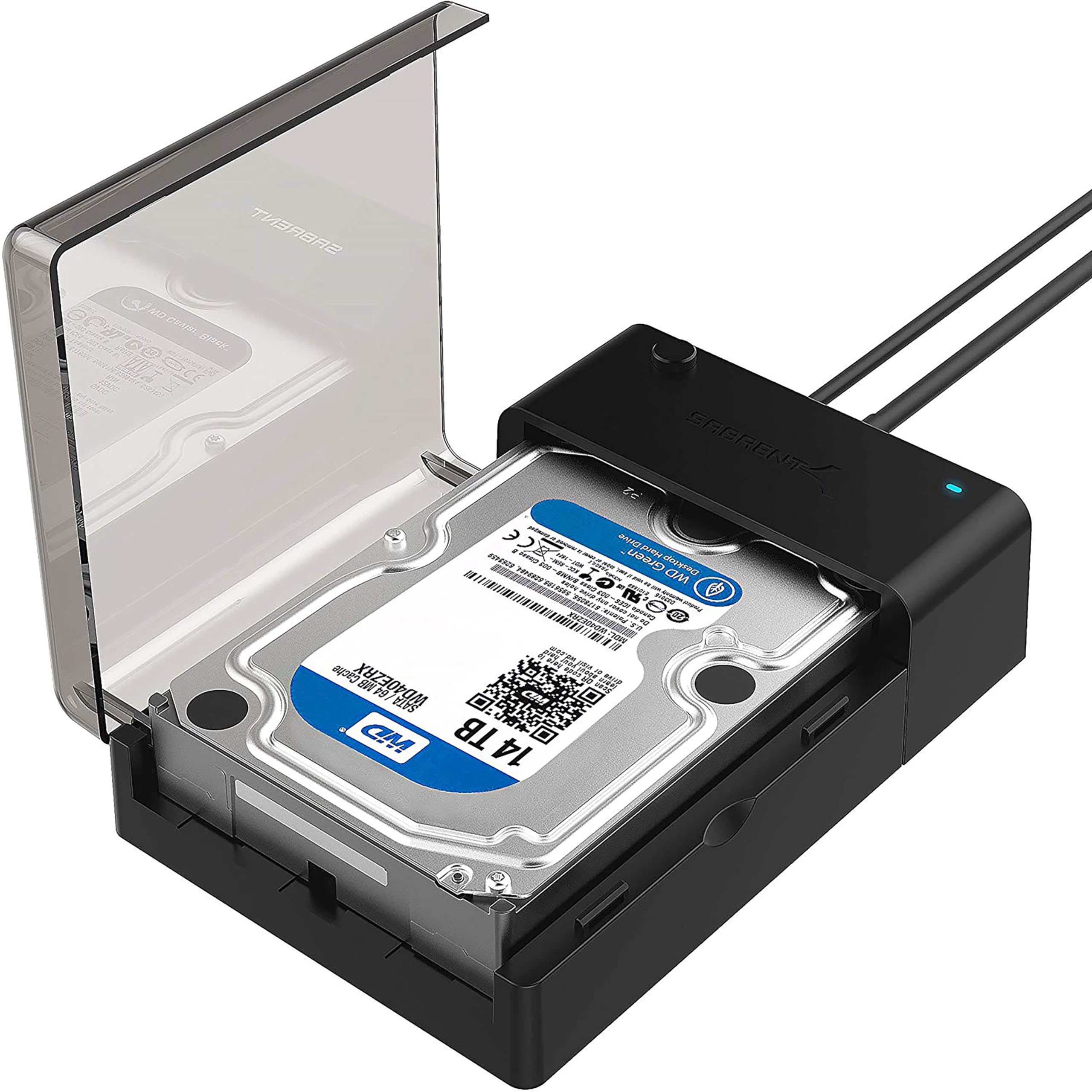
37,000+ ratings
Read Amazon ReviewsSABRENT EC-DFLT Lay-Flat SATA Dock
Choose the DS-4SSD if managing up to four slim 2.5-inch drives in one dock is the priority.
The EC-DFLT is a better fit for someone who needs to access either 2.5-inch or 3.5-inch SATA drives one at a time and values its UASP support, provided the host supports UASP.
- The EC-DFLT is a single-drive lay-flat dock for 2.5-inch and 3.5-inch SATA HDDs and SSDs.
- It supports UASP when the host system is compatible and connects through USB 3.0 Type-A.
- Its description specifies an included 12V adapter for 3.5-inch drives and notes that S.M.A.R.T. diagnostics are not supported through its USB bridge.
- The DS-4SSD accommodates up to four 2.5-inch SATA drives and includes a fan, but it excludes 15mm drives and RAID use.
Hard Drive Docking Stations alternative
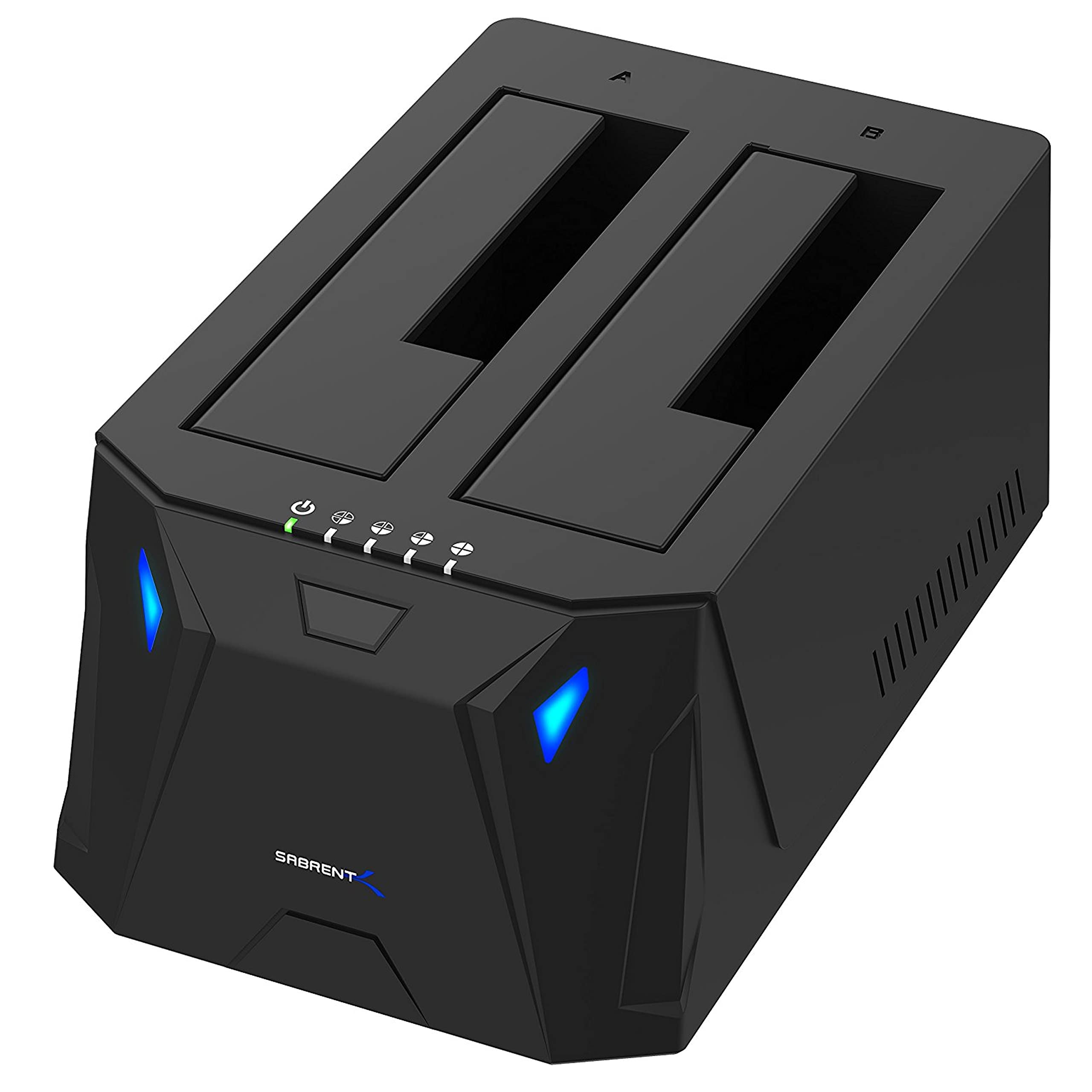
17,000+ ratings
Read Amazon ReviewsSABRENT EC-HD2B Dual-Bay SATA Dock and Cloner
Choose the DS-4SSD for a larger number of compatible 2.5-inch drives and tool-free swapping. The EC-HD2B better matches a buyer who needs two-bay access to 2.5-inch or 3.5-inch SATA drives and wants an offline cloning function.
- The EC-HD2B is a dual-bay USB 3.0 dock for standard 2.5-inch and 3.5-inch SATA HDDs or SSDs.
- It supports offline cloning, with a stated cloning rate up to 60Mbps, and lists drive support up to 10TB.
- The DS-4SSD offers four bays for 2.5-inch SATA drives, but it does not support RAID and is not described as an offline cloning dock.
Is SABRENT DS-4SSD Worth It?
The SABRENT DS-4SSD is worth considering for users who want a central, tool-free place to connect up to four 2.5-inch SATA drives.
Its magnetic cover, built-in fan, optional fan switch, and compatibility with common desktop operating systems make it a convenient design for regularly rotating drives.
Buy it only after checking drive height and workflow requirements: it supports drives up to 12.5mm thick, excludes 15mm drives, and does not support RAID.
If those limits fit your setup, the four-bay layout is its clearest advantage; if you need a wider range of drive formats or cloning, look for a dock designed around that need.
Your review at a glance
3,000+ ratings
Read Amazon ReviewsSABRENT DS-4SSD 4-Bay Docking Station
A practical fit for people who rotate several slim 2.5-inch SATA SSDs or hard drives and want tool-free access at one workstation.
- Four bays for 2.5-inch SATA SSDs or HDDs, supporting up to 16TB per drive and a maximum drive thickness of 12.5mm.
- USB 3.0 interface with a maximum stated transfer rate of 5Gbps; backward compatible with USB 2.0 and 1.1.
- Tool-free drive access and a magnetic cover designed to make swapping drives quick.
- Built-in cooling fan with an optional on/off switch for noise and power control.